
Integration and security
How to integrate PushPushGo?
See the Quick start guide and your first campaign to create an account and integrate it.
Security SRI / CSP
How to self-host or use SRI / CSP with our scripts
In integrating our scripts into your website, you can choose between two main types of JavaScript scripts entrypoints and two Service Worker deployment strategies. This document explains their differences, advantages, drawbacks, and how to implement a secure setup using CSP and SRI.
Script type | Size | Dynamic loading | CSP Compatibility | SRI (Integrity) Support | Self-hostable |
|---|---|---|---|---|---|
Chunked | ~ 14 KB +~140 KB of dynamic loaded modules | ✅ Loads from
| ❌ Harder (many sources) | ❌ Not supported for dynamic chunks | ❌ No |
All-inOne (AIO) | ~ 140 KB | ❌ No dynamic loading | ✅ Simple | ✅ Fully supported | ✅ Yes |
Script All-in-One (AIO)
Advantages:
- Simpler CSP (script-src with hash or 'self')
- Full SRI support (integrity attribute)
- Can be self-hosted (e.g., from your CDN)
- Single HTTP request
Disadvantages:
- Larger file (~140 KB)
- Slower perceived performance (everything loads upfront)
Example with SRI:
<script
  charset="UTF-8"
  src="https://s-eu-1.pushpushgo.com/js/{projectId}/aio.js"
  integrity="sha384-<YOUR_HASH>"
  crossorigin="anonymous"
  async="async">
</script>
Chunked scripts (dynamic)
Advantages:
- Smaller entrypoint (~14 KB)
- Dynamic module loading as needed
- Better time-to-interactive (TTI)
Disadvantages:
- CSP setup is harder due to multiple dynamic sources
- No SRI support for dynamically loaded scripts
- Cannot self-host dependent scripts
Example:
<script
  charset="UTF-8"
  src="https://s-eu-1.pushpushgo.com/js/{projectId}.js"
  async="async">
</script>
Service Worker strategies
PushPushGo integration also requires a Service Worker. You have two main options:
Approach | Uses
| CSP-compatible ( | SRI support | Self-hostable |
|---|---|---|---|---|
ImportScripts | ✅ Yes | ❌ No | ❌ No | ❌ No |
Downloaded | ❌ No | ✅ Yes | ✅ N/A | ✅ Yes |
Recommended for better security: Downloaded Worker (sw.js)
Benefits:
- Allows full control over CSP (worker-src 'self')
- Self-hostable and auditable
How to fetch:
wget https://s-eu-1.pushpushgo.com/{projectId}/worker.js -O sw.jsHTML CSP Example:
<meta http-equiv="Content-Security-Policy" content="
  script-src 'self' 'sha384-<HASH>';
  worker-src 'self';
">
Recommended for secure setup (All-in-One)
- Use
aio.js - Calculate SHA-384 hash (update {projectId} before execute):
curl -s https://s-eu-1.pushpushgo.com/js/{projectId}/aio.js | openssl dgst -sha384 -binary | openssl base64- Update
<script>tag with SRI - Download and host
sw.jslocally
Final CSP example:
<meta http-equiv="Content-Security-Policy" content="
  script-src 'self' https://s-eu-1.pushpushgo.com/js/{projectId}/aio.js 'sha384-<HASH>';
  worker-src 'self';
">
Update Checklist (AIO mode)
- Fetch new version of
aio.js - Recalculate SHA-384 SRI hash
- Update
scripttag in HTML - Update CSP meta tag with new
'sha384-...' - Update local
sw.js
Stay secure! if you have any questions please contact with our customer support at support@pushpushgo.com.
Freeze mode
PushPushGo offers a feature called Freeze. When enabled:
The project configuration is locked. Any future changes made in the dashboard (e.g., selectors, feature toggles, popup forms) will not propagate to production environments.
This is especially useful when you
- Host AIO scripts or workers from our CDN and want to control, audit our "changes"
- Want stable script versions without unexpected changes
- Need to ensure CSP and SRI hashes remain valid
How to enable Freeze:
- Go to:
Project > Settings > Integration > Web push integration - Enable the
Freezeoption - Wait 2–3 minutes for CDN cache to sync
Integration FAQ
I already have another service worker. Can I integrate with PushPushGo?
Yes, but since there is only one service worker allowed per domain, you need to either:
- join both service workers together using importScript:
importScripts('
https://cdn.pushpushgo.com/63c574dd030eb6beb6d2c097/worker.js
')
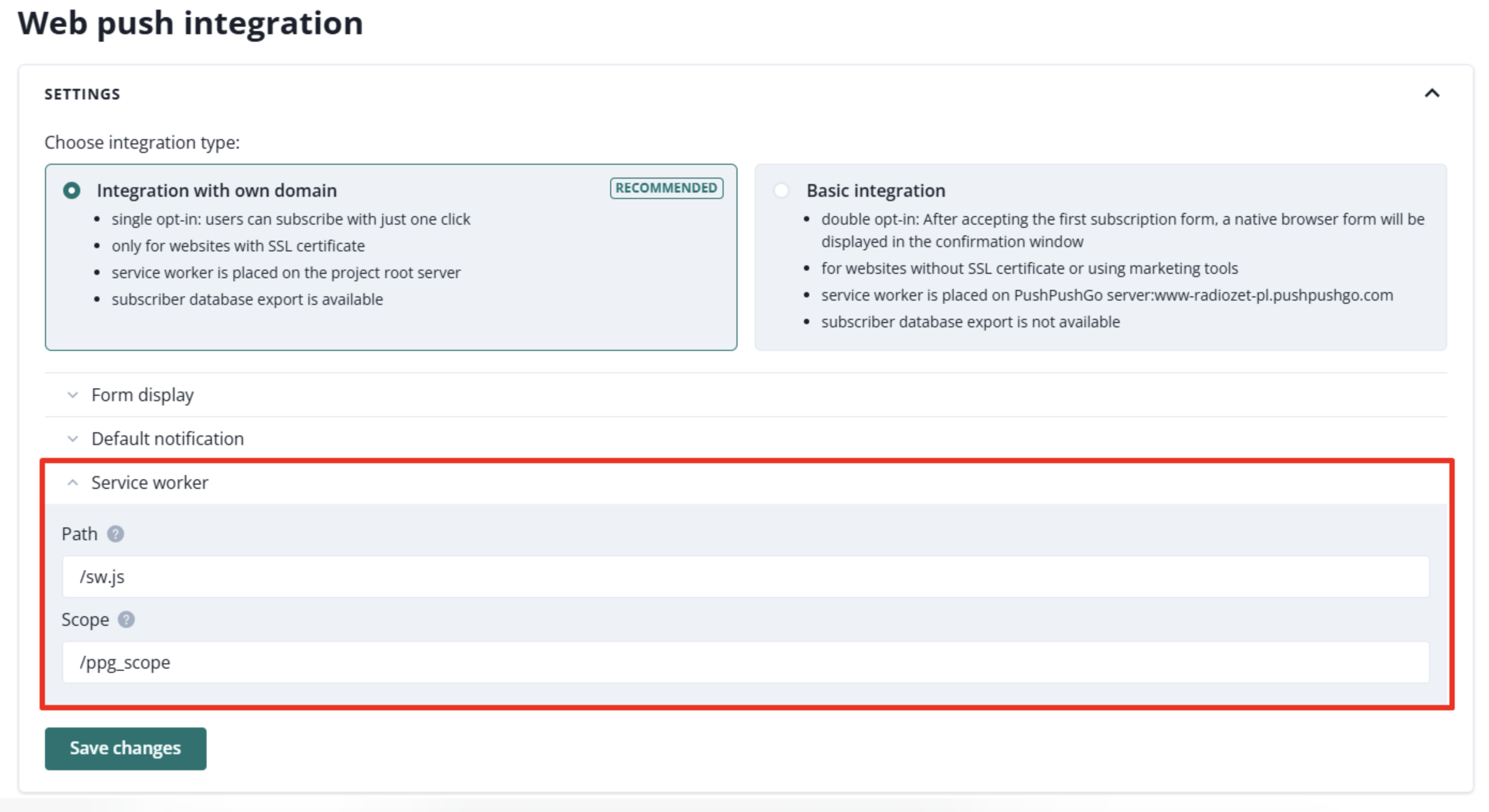
- or put them separately and point where the service worker from PushPushGo app is located (on your site) by providing its path and typing ‘/ppg_scope’ in service worker scope in Settings > Integration > Web Push (Vapid) section:
Is it possible to integrate Progressive Web Application (PWA) with PushPushGo?
Yes, but since PWA will always have its own service worker and there is only one service worker allowed, you need to use one of the solutions from question above "I already have another service worker. Can I integrate with PushPushGo?"
Is it possible to integrate my website via Google Tag Manager (GTM)?
Yes, you can integrate your website via GTM, but only basic integration will be possible, since you do not have access to the server root path.
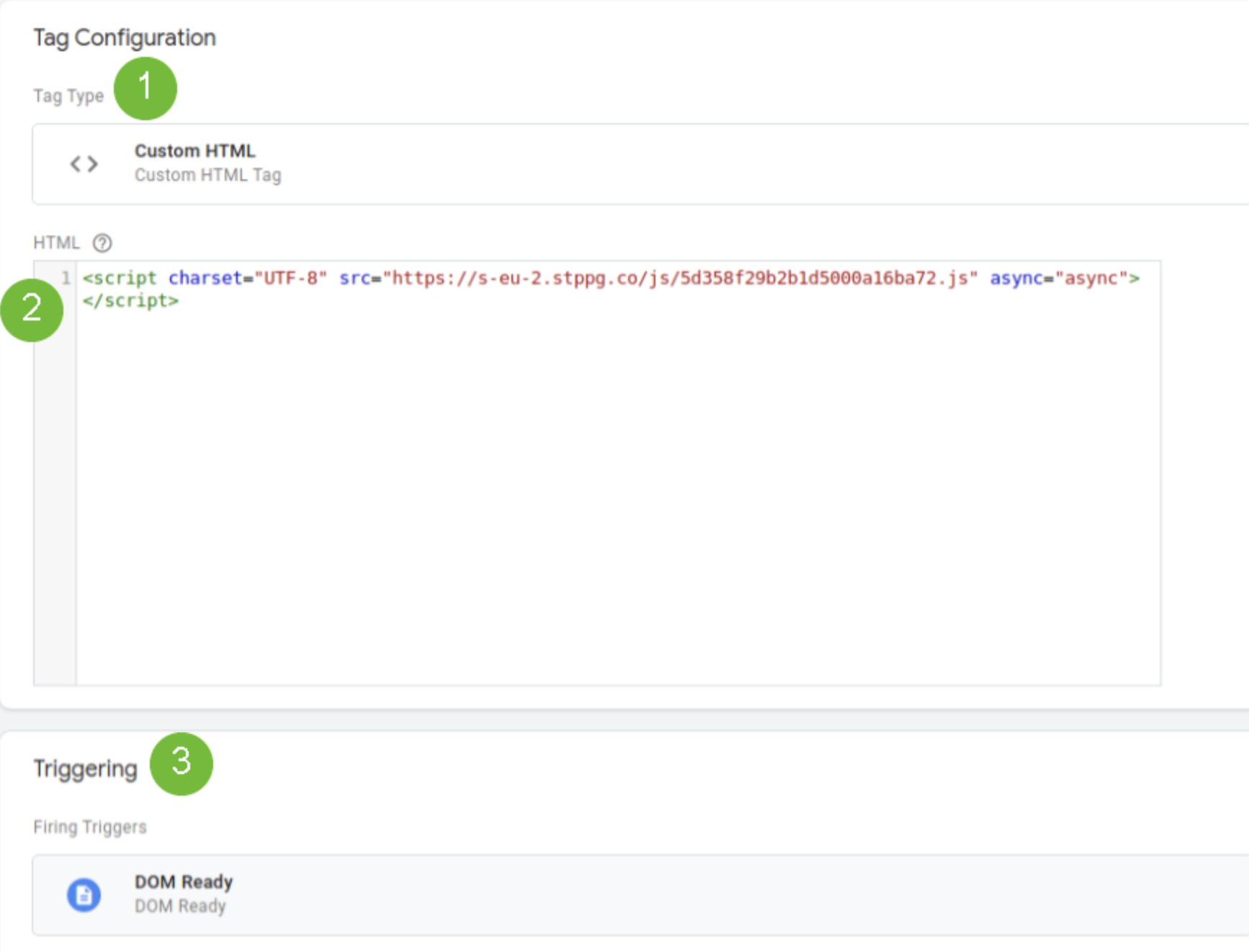
Go to your Google Tag Manager and then:
1. Create a new tag. Select the “Custom html” type and paste the code from the Integration > Installation tab.
2. Open "Advanced settings" and enter "1" in "Tag firing priority".
3. Set the trigger to “DOM Ready”.
4. Remember to publish the changes.
I have changed the service worker name and the integration is not working. Why?
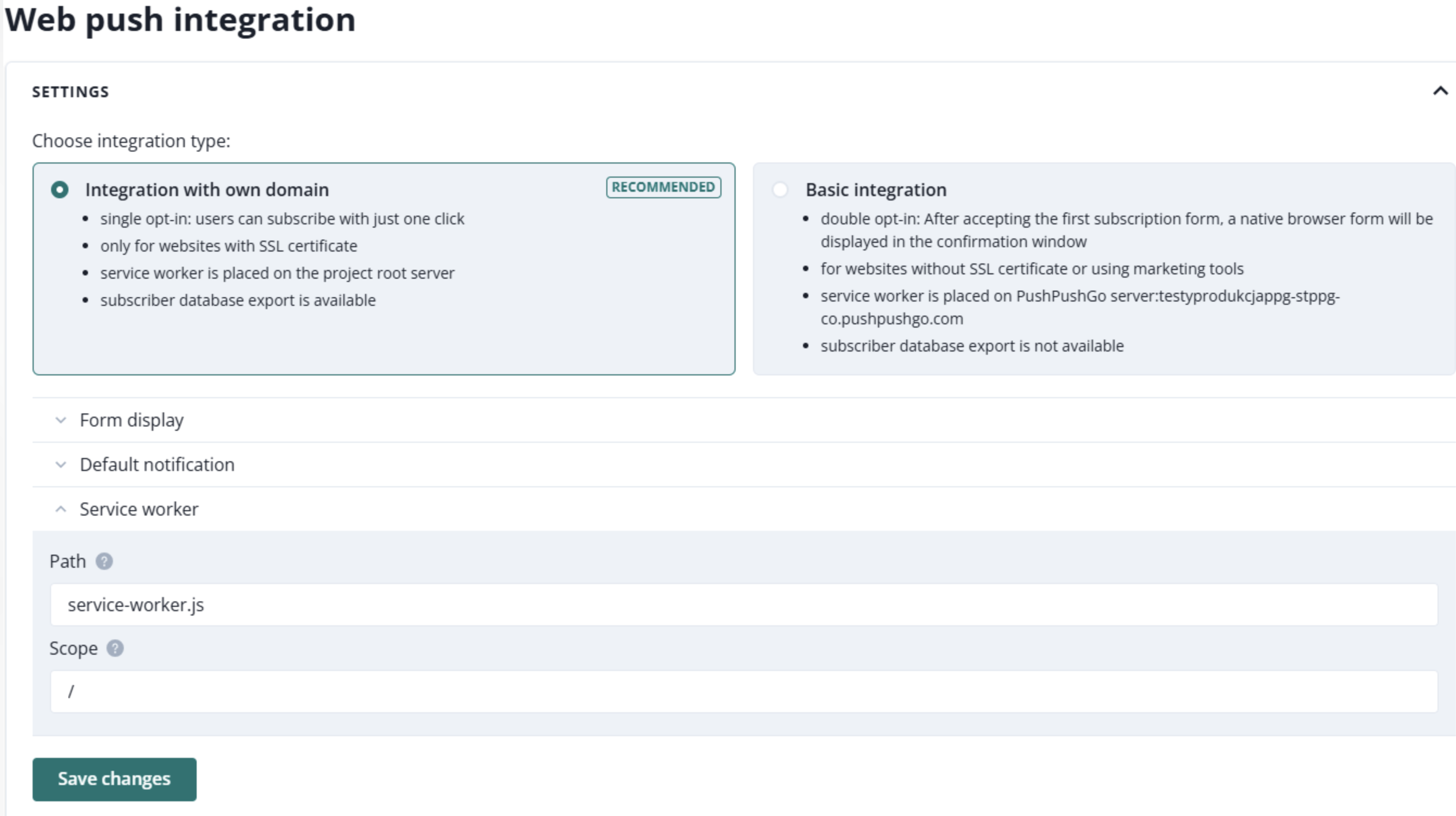
If you want to change the service worker name, for example from ‘sw\.js’ to ‘service-worker.js’:
- save the service worker path in Settings > Integration > Web Push (Vapid) as ‘/service-worker.js’.
I have changed the directory where sw.js file is located but integration is not working. Why?
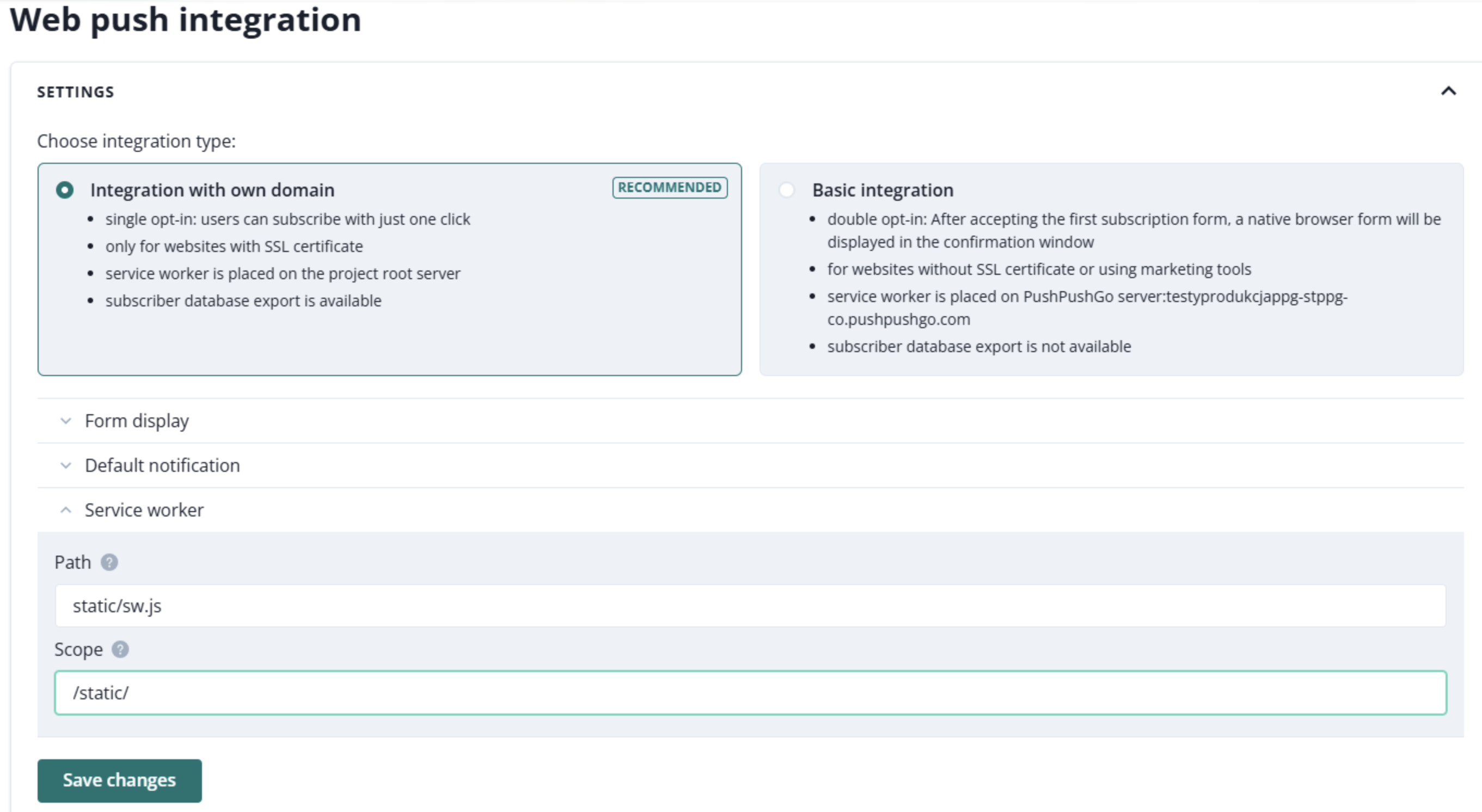
If you want to change the directory where the sw.js file is located (for example, to ‘static/sw.js’):
- save the service worker path in Settings > Integration > Web Push (Vapid) as ‘/static/sw.js’ and service worker scope as ‘/static/’.
I want to integrate one project for each subdirectory of my website. How should I do it?
You need to integrate each project by placing the integration script in the corresponding website subdirectory source code and service worker in the subdirectory folder of the server.
Then, change the service worker path & scope of every project in Settings > Integration > Web Push (Vapid) accordingly. For example, for ‘your-site.com/en’ change the service worker path to ‘/en/sw.js’ and the service worker scope to ‘/en/’, and for ‘your-site.com/de’, change the service worker path to ‘/de/sw.js’ and the service worker scope to ‘/de/’.
Sometimes when there is no possibility to add more than one worker, you can try importing subdomains’ service workers into the main service worker and write logic to use them conditionally.
How to unsubscribe from notifications?
Every sign-up for notifications appears in the browser settings. Instructions for disabling notifications vary among different browsers.
Google Chrome
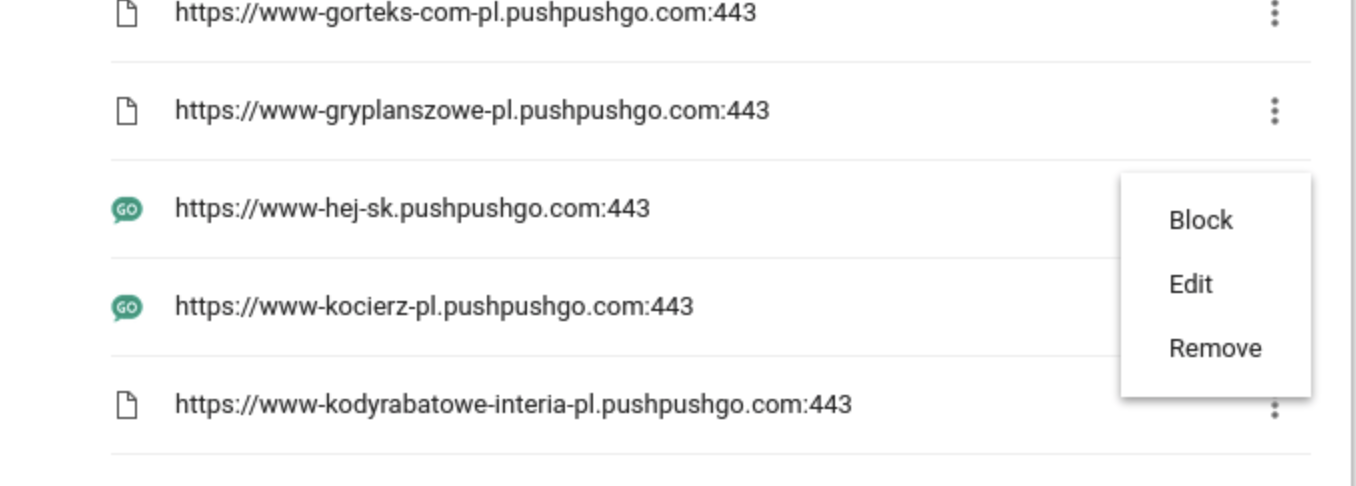
Go to Browser settings > Privacy and security > Site settings > Notifications. You can also paste chrome://settings/content/notifications in your address bar. On the list, you can find all the pages on which you have agreed to receive notifications. If you want to unsubscribe from any of them, just choose Remove from the menu.
Firefox
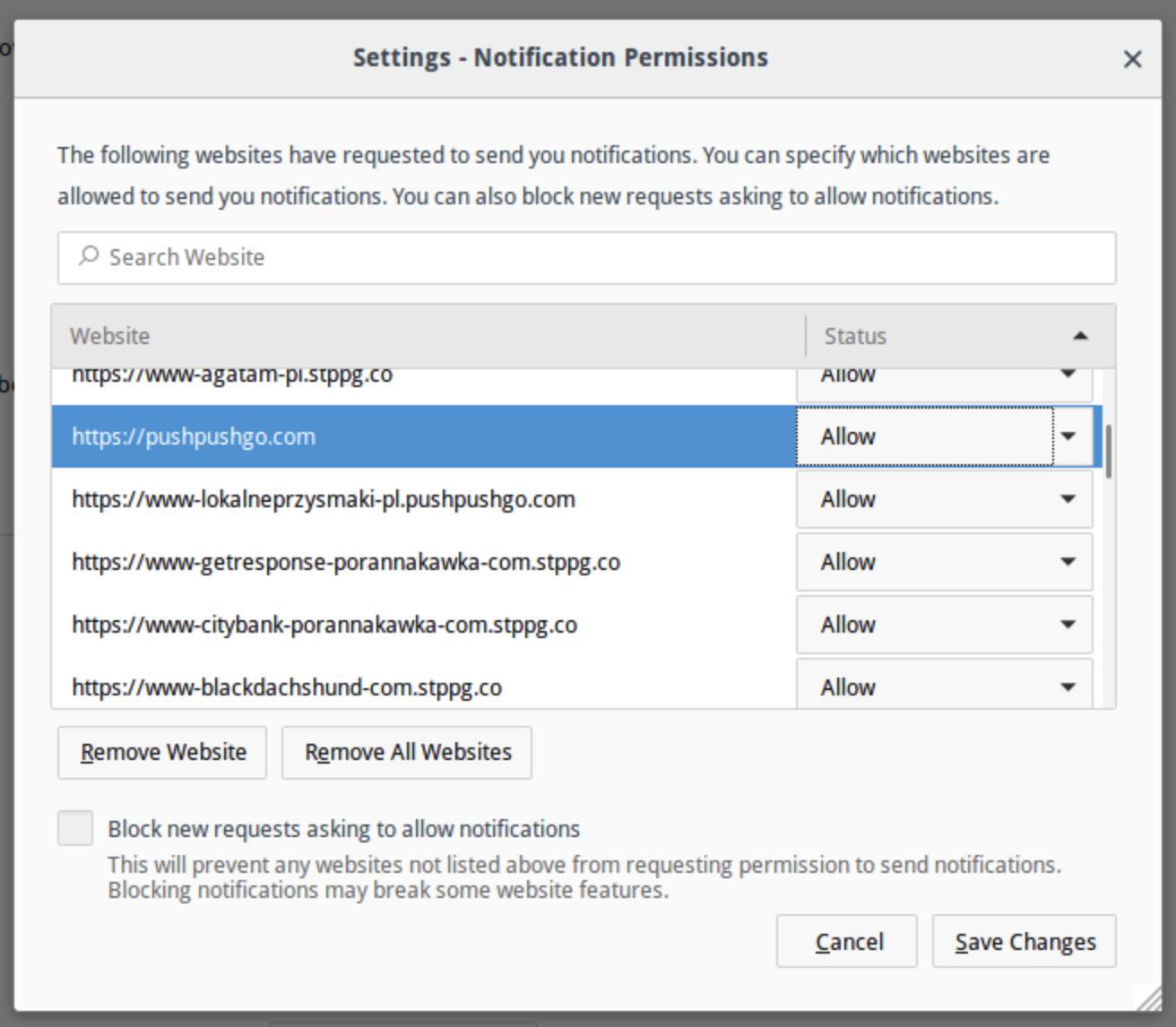
After entering Options> Privacy and Security, search for Permissions>Notifications.
On the list, search for the page from which you want to unsubscribe, and choose the Remove Webiste option.
I can't sign up for notifications
If you have properly integrated PushPushGo with your site but still don’t see the sign-up form, or if your data isn't visible in the panel as the new recipient even after allowing notifications, check whether any of these apply
* You are using an incognito window

- You are already signed up for notifications
- You have blocked notifications in the browser settings
- You have blocked notifications in the operating system settings
Sometimes, testing the sign-up form requires performing steps that are not typical for an avarage user. It’s a good idea to clear any settings that might affect the notifications before testing the sigh-up process.