
Webhooks
Webhooks are an easy way to automatically communicate one app with another. In our application Webhooks are configured in menu Settings -> Webhooks.
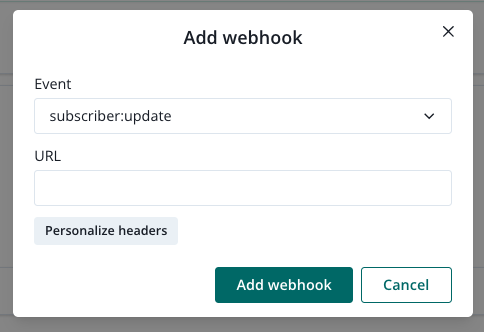
Specify what Event should trigger notification and define an api endpoint Webhook Url where we should send the request.
Webhooks are sent as POST requests, with body of type IBody
IBody property name | Type | Description |
|---|---|---|
| string | your project identifier |
| string | subscriber's customId if defined |
| string | subscriber identifier |
For every request we set an X-PPG-Signature header. Its value is a result of following operation: We take the full JSON body and sign it using HMAC-SHA1 with your ProjectId as the key.
Webhook event reference
Webhooks are sent as **HTTP POST** requests.
Each request contains a top-level field.
Field | Type | Description |
|---|---|---|
| string | Name of the event (see below) |
Identifier Notes
Field | Type | When it's used |
|---|---|---|
| string | Used for subscriber events |
| string | Used for transaction message events |
These fields both refer to the same subscriber identity, but are used in different event contexts for clarity and consistency.
WebhookEvent Type
- subscriber:update
- subscriber:subscribe
- subscriber:unsubscribe
- transaction:message:delivered
- transaction:message:clicked
- transaction:message:rejected
- transaction:message:error
Subscriber-based events
Field | Type |
|
|
|
|---|---|---|---|---|
| string | ✅ | ✅ | ✅ |
| string | ✅ | ✅ | ✅ |
| string | ✅ | ✅ | ✅ |
subscriber:update
{

  "kind": "subscriber:update",

  "projectId": "string",

  "customId": "string",

  "ppgId": "string"

}
subscriber:subscribe
{

  "kind": "subscriber:subscribe",

  "projectId": "string",

  "customId": "string",

  "ppgId": "string"

}
subscriber:unsubscribe
{
"kind": "subscriber:unsubscribe",
"projectId": "string",
"customId": "string",
"ppgId": "string"
}
scriber:u
Transaction message events
Field | Type |
|
|
|
|
|---|---|---|---|---|---|
| string | ✅ | ✅ | ✅ | ✅ |
| string | ✅ | ✅ | ✅ | ✅ |
| string | ✅ | ✅ | ✅ | ✅ |
| string | ✅ | ✅ | ✅ | ✅ |
| ISO 8601 timestamp | ✅ | ✅ | ✅ | ✅ |
| string | ✅ | |||
| string | ✅ | |||
| string | ✅ | |||
| any | ✅ |
Note: These events use ‘subscriberId’ instead of ‘ppgId’.
transaction:message:delivered
{
"kind": "transaction:message:delivered",
"projectId": "string",
"subscriberId": "string",
"messageId": "string",
"provider": "string",
"ts": "string"
}
transaction:message:clicked
{
"kind": "transaction:message:clicked",
"projectId": "string",
"subscriberId": "string",
"clickAction": "number", // 0, 1, 2
"messageId": "string",
"provider": "string",
"ts": "string"
}
transaction:message:rejected
{
"kind": "transaction:message:rejected",
"projectId": "string",
"subscriberId": "string",
"reason": "string",
"messageId": "string",
"provider": "string",
"ts": "string"
}
transaction:message:error
{
"kind": "transaction:message:error",
"projectId": "string",
"subscriberId": "string",
"error": "string",
"payload": "object",
"messageId": "string",
"provider": "string",
"ts": "string"
}
'payload' can contain any object relevant to the failed message delivery.